viaSocket
Connect YourGPT Chatbot through viaSocket to automate across your apps.
💡 Connecting Your Chatbot with viaSocket
viaSocket is a powerful workflow automation platform that allows you to connect YourGPT with hundreds of other applications without coding.
To integrate YourGPT with viaSocket, you need to generate an API key for YourGPT and establish a connection between YourGPT and viaSocket.
Make sure you have:
- A YourGPT account: Sign up here
- A viaSocket account: Sign up here
Integration Process
Generate a YourGPT API Key
Log in to your YourGPT Dashboard.
Go to Integrations and find API Integration.
Click Generate API key and copy the key for use in viaSocket.
Connect YourGPT to viaSocket
Open your viaSocket dashboard.
Go to Connections and click Connect new apps.
Search for YourGPT in the list of available apps.
Select YourGPT and paste your copied API key into the connection form.
Save to authenticate and establish the connection.
Use YourGPT in viaSocket Flows
Once connected, YourGPT will be available as an app in your viaSocket flows.
Add YourGPT actions such as Create New Session and Send Message to your flows.
Map required fields like widget_uid, session_uid, and your message content.
Edit or Update the Connection (Optional)
To update your API key or connection details, go to Connections in viaSocket.
Click Edit on the YourGPT connection and update as needed.
Save your changes to apply them across your flows.
Note
Once your connection is established, you can immediately use the YourGPT app inside your viaSocket flows.
Use cases
Auto-reply to form submissions
When someone submits your form, let YourGPT send them an instant, personalized reply — answered from your trained knowledge.
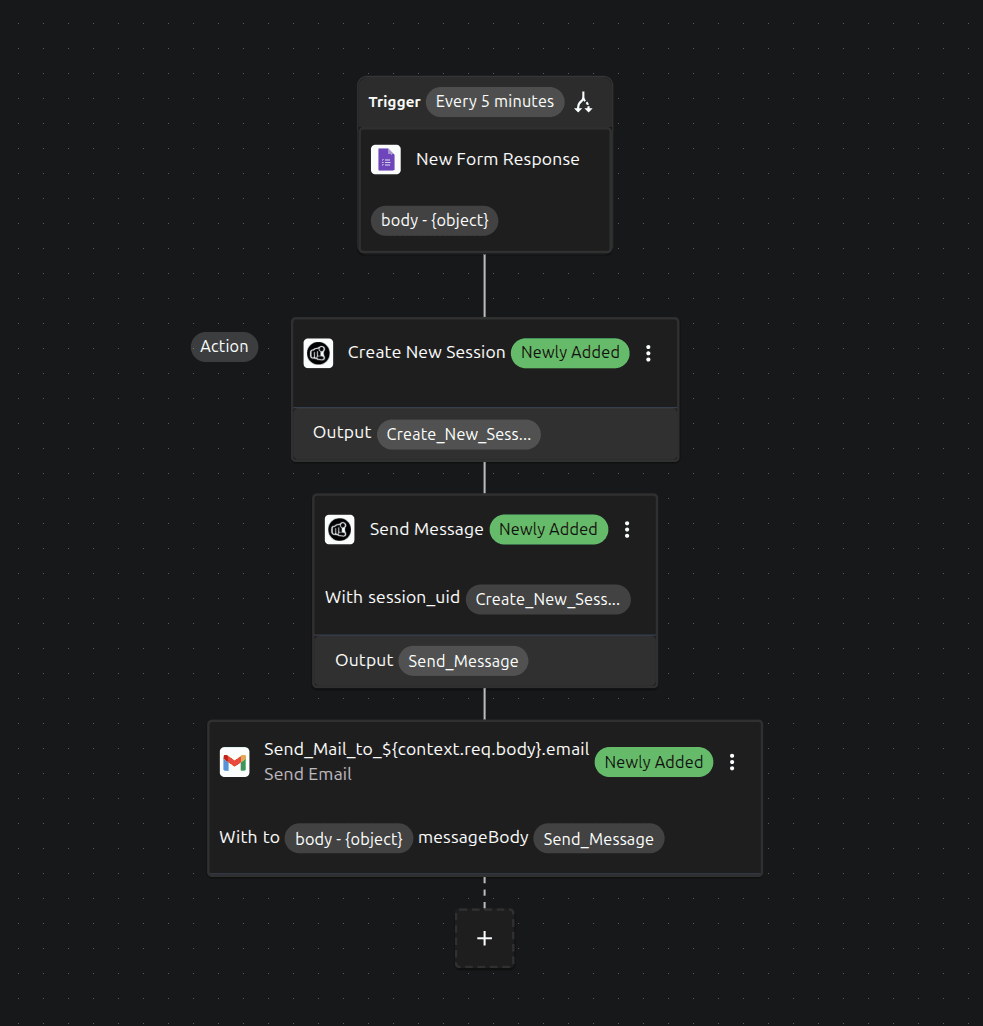
Catch the form response
Start a flow with a New Form Response trigger — for example Google Forms or Typeform.
Start a chat session
Add the YourGPT → Create New Session action and enter your Widget ID.
Let YourGPT answer
Add the YourGPT → Send Message action. Pass the submitter's question as the message and link the session from the previous step — YourGPT replies using your trained knowledge.
Email the reply
Add a Gmail → Send Email action to send YourGPT's answer back to the submitter.
Welcome and follow up with new leads
The moment your chatbot captures a lead, greet them and make sure sales follows up — automatically.
Get a webhook URL
Create a flow with Webhook as the trigger and copy the URL.
Send new leads from YourGPT
Use your chatbot's Lead Generation webhook, or a Studio API Call node, to POST the lead's name and email to the viaSocket URL.
Send a welcome email
Add a Gmail / email action that sends a personalized welcome message.
Schedule a follow-up
Add a Delay step, then a Slack message or CRM task to remind sales to follow up. Activate the flow.
By following these steps, you can integrate YourGPT AI chatbot with viaSocket. For any questions, contact our team via Live support or Mail Us.